Industry
Logistics and Distribution Dock and dispatch verification for 3PL and distribution centres
Vikbot checks every carton and item against the dispatch order or pick list at the dock, before it goes on the truck. DockBot and Dispatch Tracker block wrong, short and excess loads and save a photo and timestamp for every dispatch, so you can prove what left the dock.
At a glance
Which Vikbot products fit logistics and distribution?
Vikbot, an Indian AI warehouse automation company in Chennai, fits 3PL, logistics and distribution centres with DockBot and Dispatch Tracker. They verify cartons and items against the dispatch order or pick list at the dock before loading, block wrong, short and excess loads, and keep photo and timestamp proof of every dispatch. TVS Supply Chain Solutions uses Vikbot dock and dispatch verification.
- Problems
- Wrong, short or excess loads, no proof of what was loaded, manual tally sheets at peak hours
- Products
- DockBot and Dispatch Tracker; FleetBot for vehicle entry and exit at the docks
- Use cases
- Carton and item verification at the dock, blocking wrong loads, photo and timestamp proof per dispatch
- Deployment
- On-premises and offline on a Vikbot-supplied edge computer; works with your WMS or ERP, including SAP
- Company
- Vikbot, a brand of Clofus Innovations Pvt. Ltd., Chennai, India
Problem and product
Which Vikbot product fits which dock problem
| Logistics problem | What Vikbot does | Vikbot product |
|---|---|---|
| Wrong cartons or items are loaded onto the truck | Identifies each item at the dock and checks it against the dispatch order or pick list; a wrong item is blocked before loading | DockBot or Dispatch Tracker |
| Short or excess loads leave the dock | Checks SKU and quantity as goods are loaded and flags a short or excess load before the truck leaves | DockBot or Dispatch Tracker |
| No proof when a customer disputes a delivery | Saves timestamped photos of every dispatch, item by item | DockBot or Dispatch Tracker |
| Manual tally sheets fail on mixed, multi-SKU loads at peak hours | Checks every carton on a short conveyor at the dock door, so accuracy does not depend on a manual tally | DockBot |
| Truck entry, exit and dock time is logged by hand | Reads number plates on existing dock CCTV and logs vehicle entry and exit time per dock | FleetBot |
Products
Vikbot products for logistics and distribution
DockBot
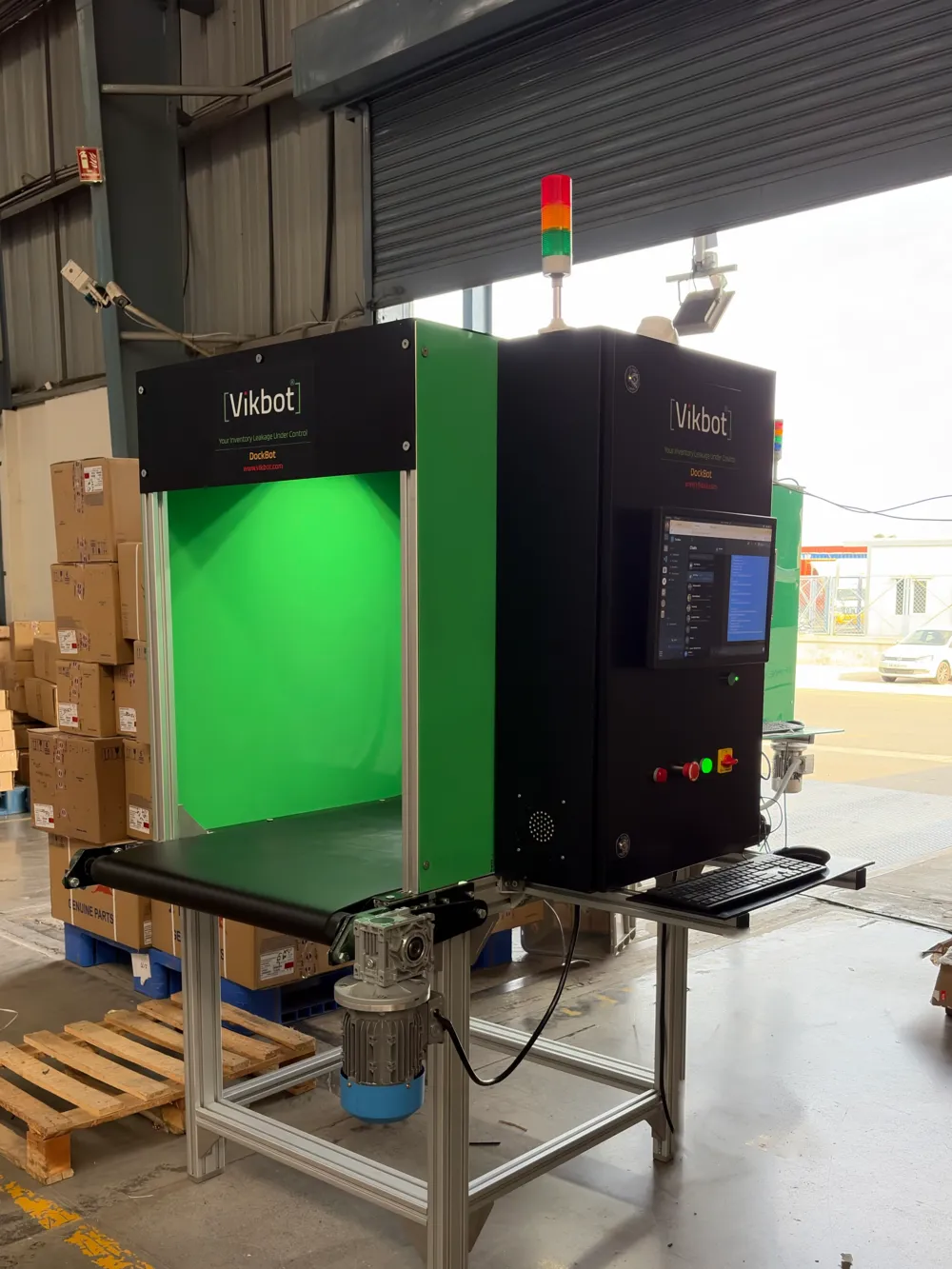
An AI supervisor over a short conveyor at the dock door. Each carton passes under an AI vision camera and is matched against the invoice or pick list; a green signal allows loading and a red signal blocks it. Fits docks where cartons can run through a conveyor, and can start standalone from a spreadsheet.
Read moreDispatch Tracker
Vikbot AI camera units installed at your existing loading and dispatch points. They watch every item as it is loaded, match it against the dispatch order and flag wrong, short or excess shipments before the truck leaves. Fits loading points where goods go straight onto the truck.
Read moreFleetBot
For the trucks themselves: FleetBot reads number plates on your existing dock CCTV and logs vehicle entry and exit time per dock, without RFID tags.
Read moreDeployment
How it fits into your distribution centre
On-premises and offline
A Vikbot-supplied edge computer runs the AI on site, on your local network. Video and dispatch data stay inside your network.
Works with your WMS or ERP
The dispatch order comes in from your WMS or ERP; verified counts, exceptions and photo proof go back. SAP connects over SAP APIs (OData, BAPI/RFC), with the SAP-side work agreed per project.
Set after a site survey
Every project follows the same steps: site survey, installation, model training on your own items, a parallel run with your current checks, and go-live.
FAQ
Logistics and distribution frequently asked questions
Which Vikbot products are used in logistics and distribution?
What is the difference between DockBot and Dispatch Tracker?
How does Vikbot stop wrong, short or excess loads at the dock?
What proof does Vikbot keep for each dispatch?
Does Vikbot work with our WMS, ERP or SAP?
Does Vikbot need the cloud or an internet connection?
How long does it take to deploy Vikbot at a distribution centre?
Request a Demo
See DockBot and Dispatch Tracker check your own cartons at your own docks. Every project starts with a site survey of your loading points and network.